
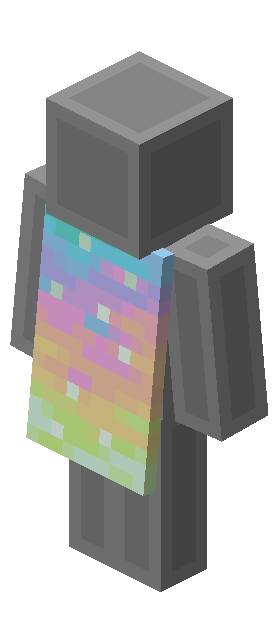
New acquisition has ended. An eligible code you already obtained can still be redeemed under its official terms. An expired code does not qualify.
During the promotion, players earned Aurora codes by watching eligible Minecraft Dungeons II livestreams on Twitch or TikTok. New codes can no longer be earned; already-earned codes must be redeemed by October 31, 2026.
Get the Aurora Cape on TikTok
TikTok is the fastest way to unlock the cape as it has the shorter viewing requirement: at least 3 minutes.
Find an eligible livestream
While signed in, search for a Minecraft Dungeons II livestream. Check its reward details for the Aurora Cape, as a stream about the game alone does not confirm eligibility.
Watch for at least 3 minutes
Simply watch the TikTok live for the required time, until you get a notification announcing your reward.
Retrieve your code
Once you complete the challenge, check your TikTok notifications for the reward code. Copy the code and redeem it on Minecraft’s redemption page.
Get the Aurora Cape on Twitch
Twitch will also get you the cape for watching a participating livestream for at least 15 minutes.
Find a stream with rewards enabled
While signed in, open a Minecraft Dungeons II livestream with Drops enabled. Look for the Drops banner or icon in chat.
Watch for at least 15 minutes
Keep watching and check your progress in Drops Inventory or the Drops panel in chat. You can switch between participating channels, but watching several at once will not make the reward unlock faster.
Claim the reward and get your code
When your progress is complete, claim the reward in Drops Inventory. Copy the code and redeem it on Minecraft’s redemption page.
Redeem your Aurora Cape
To redeem the cape, go to minecraft.net/redeem, enter your 25-character code, and sign in with the Microsoft account you use to play Minecraft. You must redeem your code by October 31, 2026.
Common questions
Do I need to watch on both platforms?
No. Choose either TikTok or Twitch.
Can I redeem my code after October 14?
Yes. If you already earned a code, you have to redeem it by October 31, 2026.
Where can I wear the Aurora Cape?
It is available for Minecraft: Java Edition and Bedrock Edition. It celebrates Minecraft Dungeons II, but cannot be worn inside Dungeons II.
What if the cape does not appear in-game?
Check the account used for redemption, then restart Minecraft and the launcher. Look in the cape options for your Java skin or Bedrock character. If the cape does not show on Java, opening Bedrock first and equipping the cape can unlock it faster for Java.